 ultimate-guide
Identifying Disc Rot in Retro Games: 2026 Guide
Table of Contents
- What Disc Rot Actually Looks Like
- Disc Rot vs Scratches: Telling Physical Damage Apart
- What Causes Disc Rot in Retro Games
- How to Store Retro Games to Slow Degradation
- Can Disc Rot Be Fixed? Repair and Ripping Options
- Equipment and Consoles More Prone to Disc Rot
- Conclusion
- Frequently Asked Questions
Last Updated: October 2, 2026
What Disc Rot Actually Looks Like
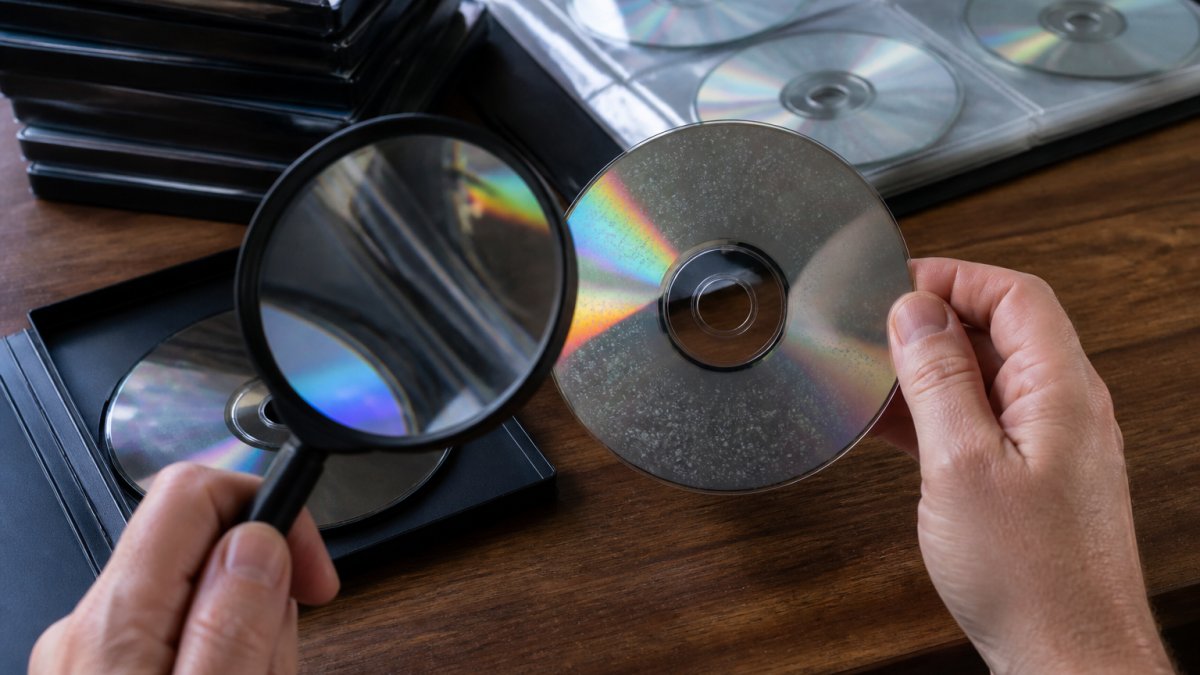
Disc rot is the physical breakdown of an optical disc's reflective layer, and it shows up as bronzing, pinholes, or cloudy patches you can see through the disc when you hold it to light. It is not surface wear. It is the data layer itself failing.

Identifying disc rot in retro games starts with one habit: never judge a disc by its label side alone.
Here is what to look for:
- Bronzing or gold discoloration spreading from the center hub outward
- Pinholes, tiny points of light that shine through when backlit
- Cloudy or milky patches that will not wipe off
- Wavy or rippled edges where the layers have begun to separate
- Dark speckling across the reflective surface
The Backlight Test and Other Ways to Inspect a Disc
The backlight test is the fastest way to spot rot at home. Hold the disc, label side toward you, in front of a bright lamp or window. Light should pass through evenly. Any pinpoint of light breaking through the reflective layer is a pinhole, and pinholes mean the aluminum layer is compromised.
A few other checks worth running:
- Tilt test: angle the disc under a lamp and look for a mirror-like finish. Cloudiness or a bronze tint is a bad sign.
- Edge inspection: run your eye around the rim for delamination, where the layers start peeling apart.
- Play test: load the disc and listen. Skipping, freezing, or read errors on a clean disc point to data-layer damage, not dirt.
Disc Rot vs Scratches: Telling Physical Damage Apart
Disc rot and scratches are different problems with different fixes, and confusing them wastes time. A scratch sits on the surface and scatters the laser. Rot happens inside the disc, in the reflective or data layer, where no resurfacing machine can reach.
| Feature | Scratches | Disc Rot |
|---|---|---|
| Location | Surface layer | Reflective/data layer |
| Appearance | Linear marks | Spots, pinholes, bronzing |
| Moves with light angle | Yes | No |
| Repairable | Often, by resurfacing | No |
| Playback effect | Skipping, stutter | Read errors, total failure |
What Causes Disc Rot in Retro Games
Manufacturing defects and storage conditions cause most disc rot, and the two often work together. A disc made with a flawed seal between its layers will corrode faster, but heat, humidity, and sunlight accelerate the process in any disc.
The main culprits:
- Poor manufacturing seals that let oxygen reach the aluminum layer
- Humidity, which drives oxidation of the reflective surface
- Heat and temperature swings, which stress the bond between layers
- UV light, which degrades the lacquer coating and polycarbonate over years
- Solvents and adhesives from cheap sleeves or labels that leach into the disc
How to Store Retro Games to Slow Degradation
Cool, dark, dry, and vertical is the short answer, but the useful version explains why each control matters and how to verify it. Rot is a chemical reaction, oxidation of the reflective layer plus hydrolysis of the bond between layers, and reaction rates respond to temperature and moisture. You cannot reverse rot, but you can slow it dramatically by controlling the environment.
A Storage Setup You Can Actually Verify
A preservation-grade shelf does not require a lab. It requires measurement.
- Place a hygrometer and a min/max thermometer in the cabinet. Check them monthly.
- Add a small dehumidifier or silica packs if humidity drifts above 50 percent. Recharge silica in an oven per the manufacturer's instructions.
- Log the readings. A simple spreadsheet of date, temperature, and humidity turns guesswork into a trend line.
- Re-inspect annually. Backlight-test a sample of discs each year and compare against last year's notes. If bronzing is spreading, the environment is losing the fight.
Can Disc Rot Be Fixed? Repair and Ripping Options
Disc rot cannot be fixed, but the data on a rotting disc can sometimes be saved before the disc fails completely. Once the reflective layer corrodes, the physical disc is permanently damaged. Your best move is digital preservation: rip the game while it still reads.
Here is how to approach it:
- Test readability now. If the disc still loads, do not wait. Rot progresses.
- Rip to a digital file. Use a disc drive and software like
ddrescue, which reads around bad sectors instead of giving up. - Verify the dump. Check the file against a known-good checksum where one exists.
- Store multiple copies. Keep the rip on two drives plus one offsite or cloud backup.
- Retire the disc. Move it to cool, dry storage and stop playing it.
Equipment and Consoles More Prone to Disc Rot
Susceptibility tracks with how a disc was built, not just how old it is. A CD, a DVD, and a Blu-ray are three different sandwiches of polycarbonate, reflective metal, and lacquer, and each fails in its own way. Understanding the construction explains why some discs bronze in a decade while others outlive their owners.
Other factors that raise risk regardless of format:
- Third-party and budget pressings with thinner lacquer or looser bond tolerances fail faster than first-party discs.
- Paper sleeves abrade the surface and can transfer acids from the paper over years.
- Slot-loading drives drag the disc across rollers and are harder on the surface than tray-loading drives.
- Discs stored flat in stacks warp under pressure, stressing the bond.
Testing Tools That Catch Rot Before You Can See It
Visual inspection catches advanced rot. Read-error testing catches it earlier. Most optical drives and free utilities can report error rates that rise before pinholes become visible.
- Error-rate scanning. Tools that read every sector and report error counts (often called C1/C2 or PI/PO error scanning for CDs and DVDs) will show a disc trending toward failure even when it still plays.
- Ripping software with retry logging. A tool like
ddrescuelogs which sectors needed retries. A disc that rips clean today but logs a cluster of bad sectors is a candidate for immediate backup. - Checksum verification. Compare a fresh rip against a known-good checksum where one exists. A mismatch on a visually clean disc is an early warning.
Conclusion
Rebuilding a childhood collection means confronting a hard truth: some of those discs are already dying, and no polish or resurfacing will bring them back. The work is spotting rot early, storing what you have correctly, and ripping the games you love before the data layer fails.
Frequently Asked Questions
What does disc rot look like on a game disc?
Disc rot shows up as small pinholes, cloudy patches, or bronze discoloration on the reflective surface of a disc. Hold it up to a bright light or use a backlight test to catch pinholes that are invisible under normal room lighting. Early signs often appear near the center hub or outer edge, where the aluminum layer and lacquer coating are thinnest. If you see light passing through spots that should be solid, that disc is already degrading.
Can disc rot be repaired or reversed?
No. Disc rot is permanent because it involves oxidation of the aluminum layer inside the disc, which cannot be restored once it has started. Polishing or resurfacing only addresses scratches on the outer polycarbonate, not internal degradation. The best move is to rip the disc to a digital file immediately if it still reads, then store the original under stable conditions. Once read errors start, the window for a clean rip closes fast.
Does disc rot spread to other games in my collection?
Disc rot does not spread from one disc to another the way mold or mildew does. Each disc degrades based on its own manufacturing defects and storage conditions. However, if several discs share the same humid environment or were stored in the same damp box, they may all show signs at once. Check every disc in a suspect collection individually rather than assuming the problem is isolated.
What causes disc rot in retro video games?
The main causes are manufacturing defects and long-term exposure to heat, humidity, and UV light. A disc is built from a polycarbonate layer, an aluminum data layer, and a thin lacquer coating. If the lacquer has a pinhole or the seal at the hub is imperfect, oxygen and moisture reach the aluminum and start oxidation. Storage conditions above 60% relative humidity or in direct sunlight accelerate the process significantly.
Are some consoles more prone to disc rot than others?
Consoles that use CD-based media, like the PlayStation 1, Sega CD, and TurboGrafx-CD, are the most vulnerable because early CD manufacturing had looser quality control on the lacquer seal. Later DVD-based systems like the PlayStation 2 and GameCube generally hold up better, though no optical disc is immune. Discs pressed at certain plants in the early 1990s have known higher failure rates, so those titles deserve extra scrutiny when buying used.
How can I prevent disc rot in my retro game collection?
Keep discs out of attics, basements, and garages where temperature and humidity swing. Store them vertically in original cases or acid-free sleeves, away from direct sunlight and heat sources. Aim for a stable environment around 65-70 degrees Fahrenheit and under 50% relative humidity. For high-value titles, rip a backup copy now while the disc still reads cleanly, so you have a digital fallback if the original degrades later.